private beta
Attention is all you have.
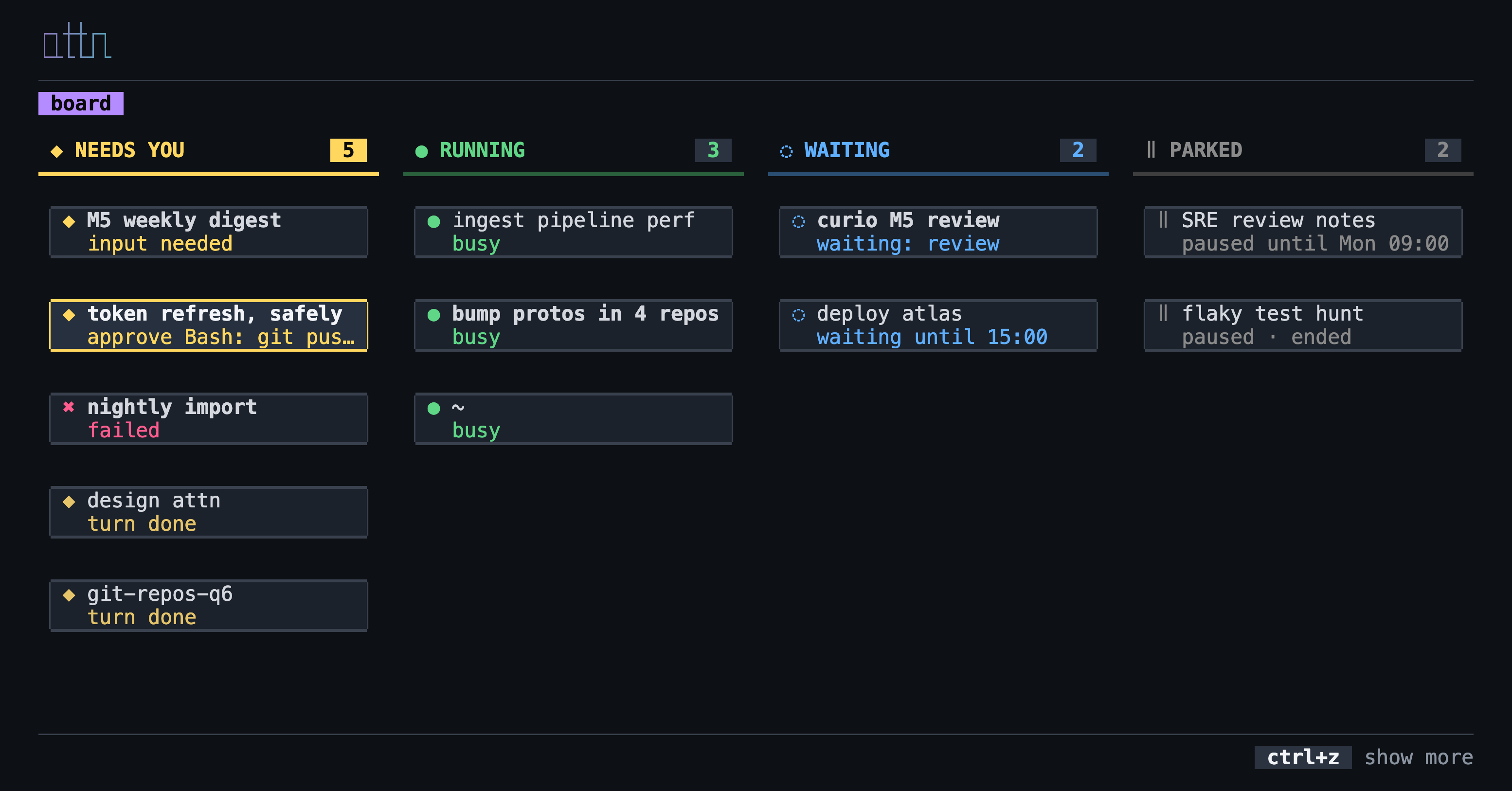
attn is one board for all your work: it shows every task you have, which ones need you, and why. Pressing Enter on a task drops you into the agent harness that's working on it. If you close the terminal, they keep working in the background. If you restart your computer, attn keeps track and brings them all back.
macOS · Linux
agents are workloads
Agents are workloads.
Each agent is working on a task, and each task has a status, a history, and a place where it runs. Unlike most workloads, agents are interactive. They finish a turn then ask for an approval or a question.
So attn is built around where to look. You start at the board and go down one level at a time. Each level is full screen and about one thing, so you're never looking at two things at once. This is one way to guard our attention, because attention is all we have.
- board
Every agent, a column per state, the ones that need you first.
- board › agent
enter takes you into the agent itself, in place of the board, and you work with it as you always do. ctrl+\ brings the board back, as you left it.
- board › details
d opens what attn knows about an agent instead: its card, its transcript as it's written, its conversations, its events and the background work it started. esc goes back up.
runtimes
Run them where you like.
In attn's own session
attn new starts Claude in a tmux session attn keeps out of sight. Close the terminal or quit the board and it keeps working. After a restart, attn resumes its conversation. Enter opens it right where you are.
In the tabs you already have
Sessions already open in your terminal show up on the board without moving anything. Enter takes you to their tab.
Somewhere else planned
Agents on other machines and other runtimes, on the same board, opened the same way.
status
Status from the agent, not the screen.
attn knows an agent wants an approval, has a question or finished its turn because Claude Code tells it, through its hooks. It doesn't read the screen, so it isn't guessing. Each card says what it's waiting for in words.
- ◆ approve Bash: go test -race ./...
- ◆ turn done
- ● busy · 2 subagents · 1 workflow
and the rest
The small things, done properly.
Command palette
: or ctrl+k. Every action, agent, theme and setting in one search.
Search
/ narrows the board to the agents that match as you type. The palette finds any agent, archived ones too.
Side by side
b opens an agent in a split beside the board, and switches it as you move.
Usage
Your 5-hour and 7-day limits at the top, each agent's context on its card.
Your keys
Rebind any key, per view. attn tells you about a conflict as you press it.
New agents
N starts one in a folder you pick and opens it.
where it's going
A model for agents, not a wrapper for one.
Today attn runs Claude Code on your Mac. Underneath is a model for agents in general. The agent could be Claude, Codex, pi or OpenCode. It could run in a tab, in tmux or Rex, or on a server somewhere. Same board, same views, same verbs.
Next come the verbs you'd expect from an orchestrator: restart an agent onto a new version without losing its place, and workflows that look after your agents while you're away.
questions
Questions
- Does attn send anything anywhere?
- No. The board talks to attn's daemon over a local socket. There's no account and no telemetry, and nothing leaves your Mac.
- What does it cost?
- Nothing.
- What does it need?
- macOS, Claude Code, and iTerm2 or Ghostty. Hosted agents use tmux from Homebrew.
Try it early.
The beta opens in small groups. Leave your email and I'll write when there's a build for you.