curio·open source, for macOS
Search everything you've ever bookmarked.
You save pages every day and forget most of them, and your accumulated curiosity remains invisible to the tools you think with. Curio reads every page you've bookmarked, keeps a copy on your Mac, and makes all of it searchable. Its MCP server lets your agent look through your library too, so your questions get answers grounded in the pages you thought were worth keeping.
$ brew install samsar/tap/curio
$ curio up
Everything runs on your Mac: your library, the search, and the AI models. Apple silicon · macOS 14+ · Apache 2.0
what you can do with it
Your bookmarks, finally useful.
Find that article again
curio search "rolling out feature flags" searches the full text of every saved page, by meaning, not just keywords. Narrow it to when, where or how you saved it.
Ask your agent about your reading
Connect curio to your favorite agent, then ask things like "what have I saved about pricing experiments?"
See what you're into
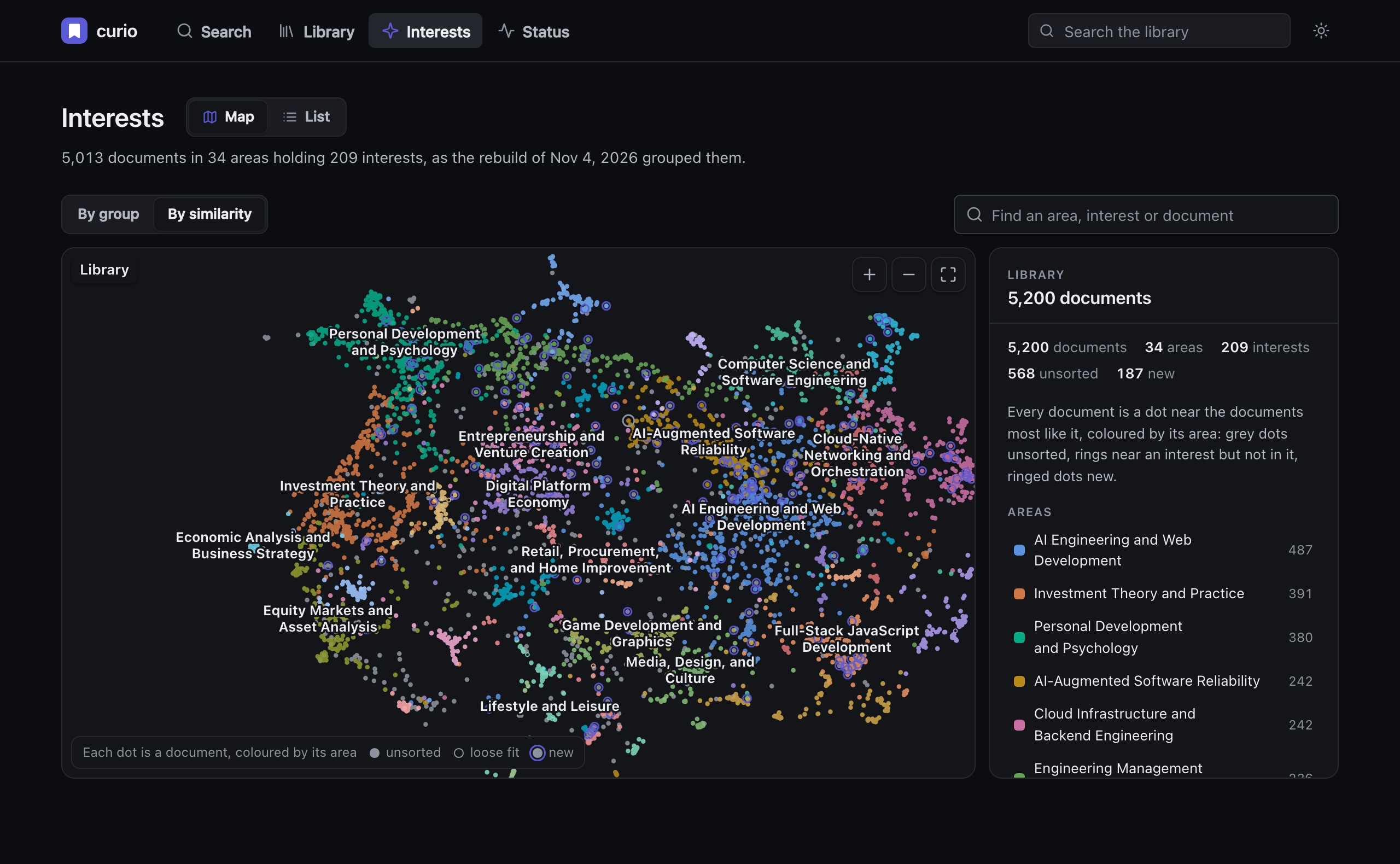
curio interests groups your library into topics and names them.
Find related reads
curio related <id> shows other pages about the same thing.
Keep old links useful
Pages are saved when curio fetches them, so you still have the text of bookmarks that have since gone dead.
A dashboard of your own
curio ui opens your library in the browser, served by your Mac: search as you type, read any saved page, and see what curio is working on.
ask it a question
Search the way you remember.
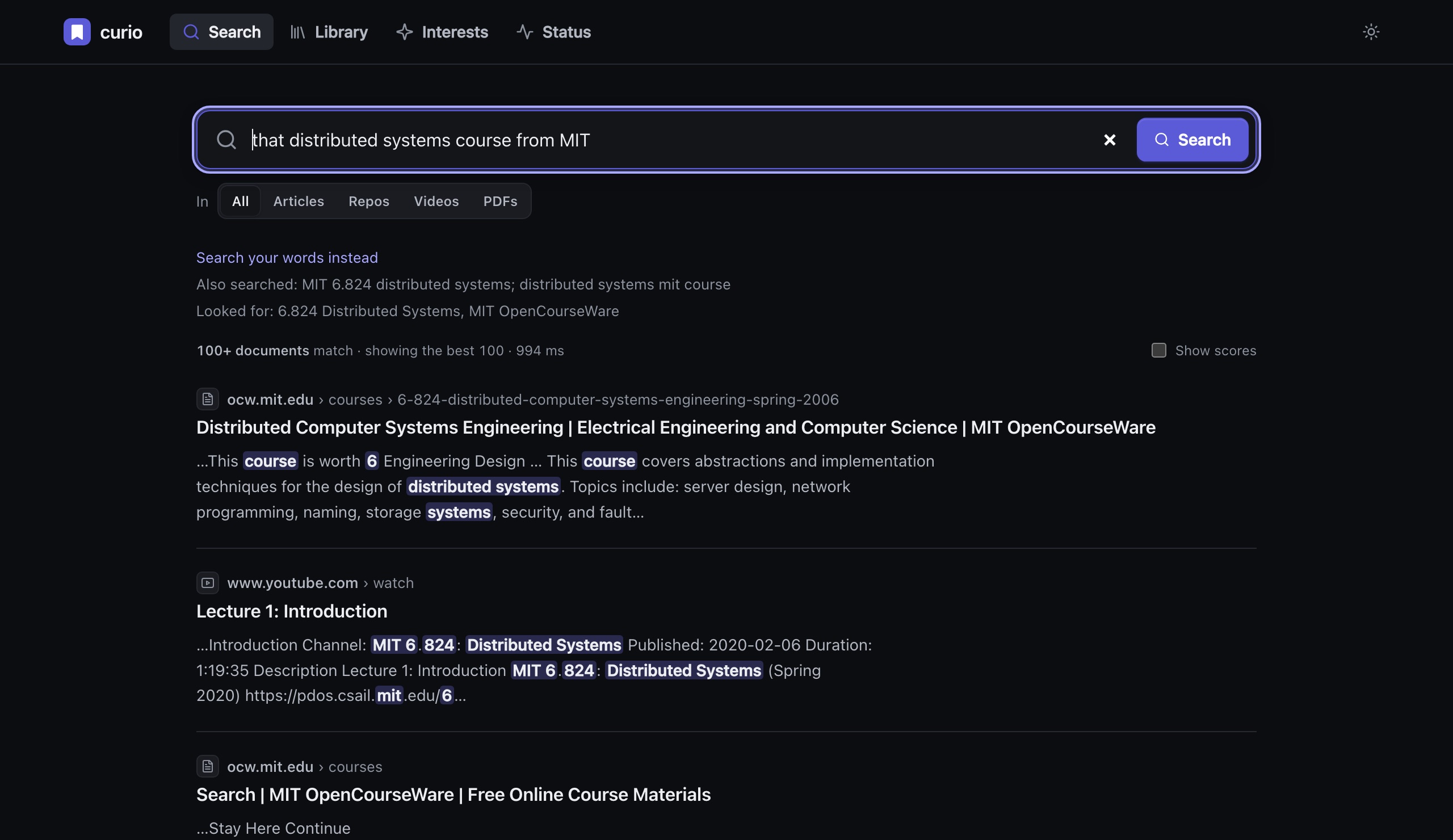
Ask it a question, "the talks on raft I saved last summer", and a local model first reads what the question says (the dates, the kind of page, what it points at) and searches with that. It shows what it understood, and --literal searches your words alone.
$ curio search "the talks on raft I saved last summer"
understood (gemma4:26b, 1.3 s): list · Videos · Saved Jun 1 – Sep 22
also searched: raft consensus; leader election

 1. Designing for Understandability: the Raft Consensus Algorithm
    youtube.com/watch?v=vYp4LYbnnW8
    …the reason we built Raft was that Paxos was too hard to teach.
    We split it into leader election, log replication and safety…

 2. Raft: the understandable distributed consensus protocol
    youtube.com/watch?v=ro2fU8_mr2w
    …a leader is elected for a term; followers time out and start an election…
--saved-after 2024-01-01, --site example.com or --folder "/Bookmarks Bar/Work" narrow a search by hand.interests
See what you're into.
curio groups your library into topics and names them: areas, and the interests inside them. The map draws every page you've saved near the ones like it, so you can zoom from a whole area down to a single page. Names stay put as your library grows.
use it with claude
Answers grounded in what you've read.
One line, and Claude Code can search your library, open a saved page, find related pages, and see your interests. Claude Desktop and any other MCP client work too.
claude mcp add curio -- curio-mcp
- what have I saved about pricing experiments?
- find the post I kept on SQLite's WAL mode · and summarize it
- anything in my bookmarks on rate limiting? · compare them
everyday commands
Made for the terminal and the Web.
curio search "what you remember about it"   # search your library
curio status --follow                       # watch an import until it's done
curio ui                                    # open the dashboard in your browser
curio interests                             # the topics in your library
curio add https://example.com/article       # save one page
curio import safari                         # import more bookmarks later
To keep your Mac comfortable during a big import:
curio pause | resume            # stop starting new work, then pick up again
curio throttle gentle           # do less at once, so the fans stay quiet
curio schedule 22:00-07:00      # only work overnight
curio keep-awake on             # stay awake while importing, when plugged in
If something seems off, run curio doctor: it checks every part and says what to fix.
privacy
Your library, the search, and the AI models all live on your Mac.
curio runs its models through Ollama, on your Mac. There's no account and no telemetry. curio goes online to download the pages you bookmarked.
For pages that block it, curio can ask Jina Reader to fetch the page; that service sees the page's address. To turn this off, set fetcher.native.jina_fallback: false in ~/.curio/config.yaml.
get started
That's it.
$ brew install samsar/tap/curio
$ curio up
curio up walks you through the rest and asks before each step:
- It checks that your Mac can run AI models locally.
- It installs Ollama, the app that runs those models, if you don't have it yet.
- It picks the right models for your Mac, tells you why, and downloads them.
- It sets curio up to keep running in the background, even after a restart.
- It asks where to import your bookmarks from: Chrome, Safari, Firefox, or an exported file. It shows how many are new and how long they'll take.
A few thousand bookmarks takes a couple of hours to fetch and index. curio tells you when to check back, and you can search while it works. Run curio up again whenever you like. If everything's fine, it says "Nothing to do: curio is up."
good to know
Questions
- What does it need?
- A Mac with Apple silicon (M1 or later), macOS 14 or newer, and Homebrew. 16 GB of memory or more is best, though 8 GB works. You'll also need about 5–25 GB of free disk, depending on your Mac.
- What does it cost?
- Nothing. curio is open source under the Apache License 2.0. The code, the design decisions and the roadmap are all on GitHub.
- How do I upgrade?
- Run
brew upgrade curio, thencurio up. - Can I start over?
curio up --freshmoves your current library aside to~/.curio.bak-<date>and starts a new one. Nothing is deleted.- How do I uninstall it?
- Run
curio daemon uninstall, thenbrew uninstall curio. Your library stays in~/.curiountil you delete it.
Get value out of your bookmarks.
Install it, run curio up, and come back to a library you can search. Issues and pull requests welcome.
$ brew install samsar/tap/curio
$ curio up